HDR brightness and accessibility
A setting to stop sudden bright flashes on screens
Versions: balanced · technical · this page (plain language) · live demo
Author: Prakash Upadhyay
Discussion: w3c/csswg-drafts#14616
Published: 18 Oct 2026. Feedback welcome: open an issue.
This version is written for anyone, with no technical background needed. Words that may be new are explained the first time they appear, and there is a short glossary at the end.
In one paragraph
Many newer phones, laptops and TVs have screens that can light up parts of a picture much brighter than normal. That is lovely for films and photos. But sometimes a small, ordinary image on a web page, like a company logo in an email, uses that extra brightness by accident and suddenly glows far brighter than everything around it. Today, people have no way to say “please don’t do that to me” and have websites and apps listen. This proposal asks for exactly that: a simple setting, similar to the existing “reduce motion” setting, that keeps images from shining brighter than normal white.
The problem
Some screens can go brighter than “white”
On an ordinary screen, the white of a blank page is as bright as anything gets. Newer screens are different. They are called HDR screens (HDR stands for “high dynamic range”). They keep extra brightness in reserve, so a sunset or a car headlight in a photo can shine several times brighter than the page’s white. MacBook Pro laptops, recent iPhones and iPads, many Android phones and many newer monitors and TVs have HDR screens.
It happens by accident
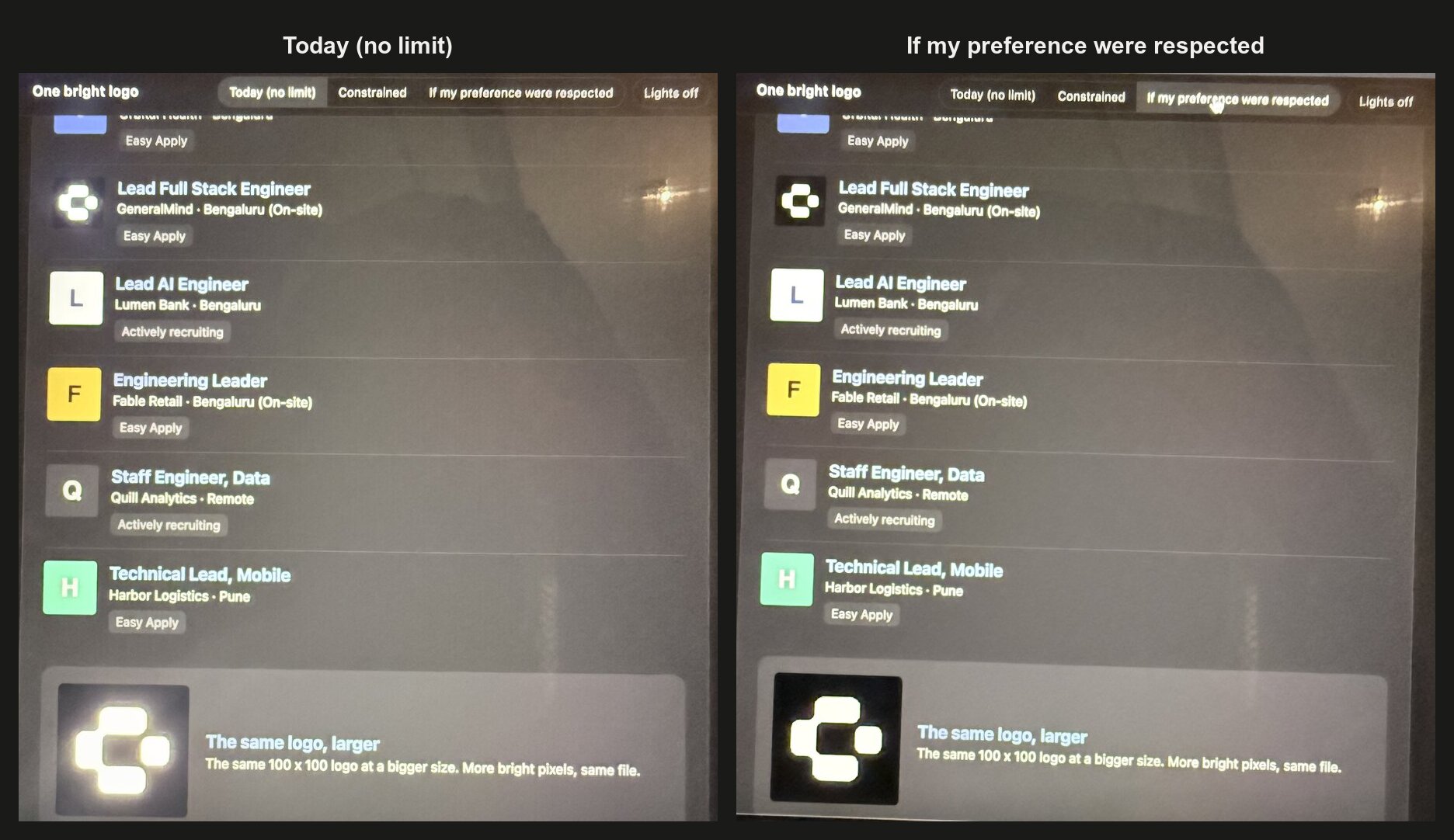
This idea started with a real email. It was a LinkedIn job alert, opened in Yahoo Mail on a MacBook. One small company logo, white on a dark square, was glowing much brighter than the rest of the email, like a little torch on the page.
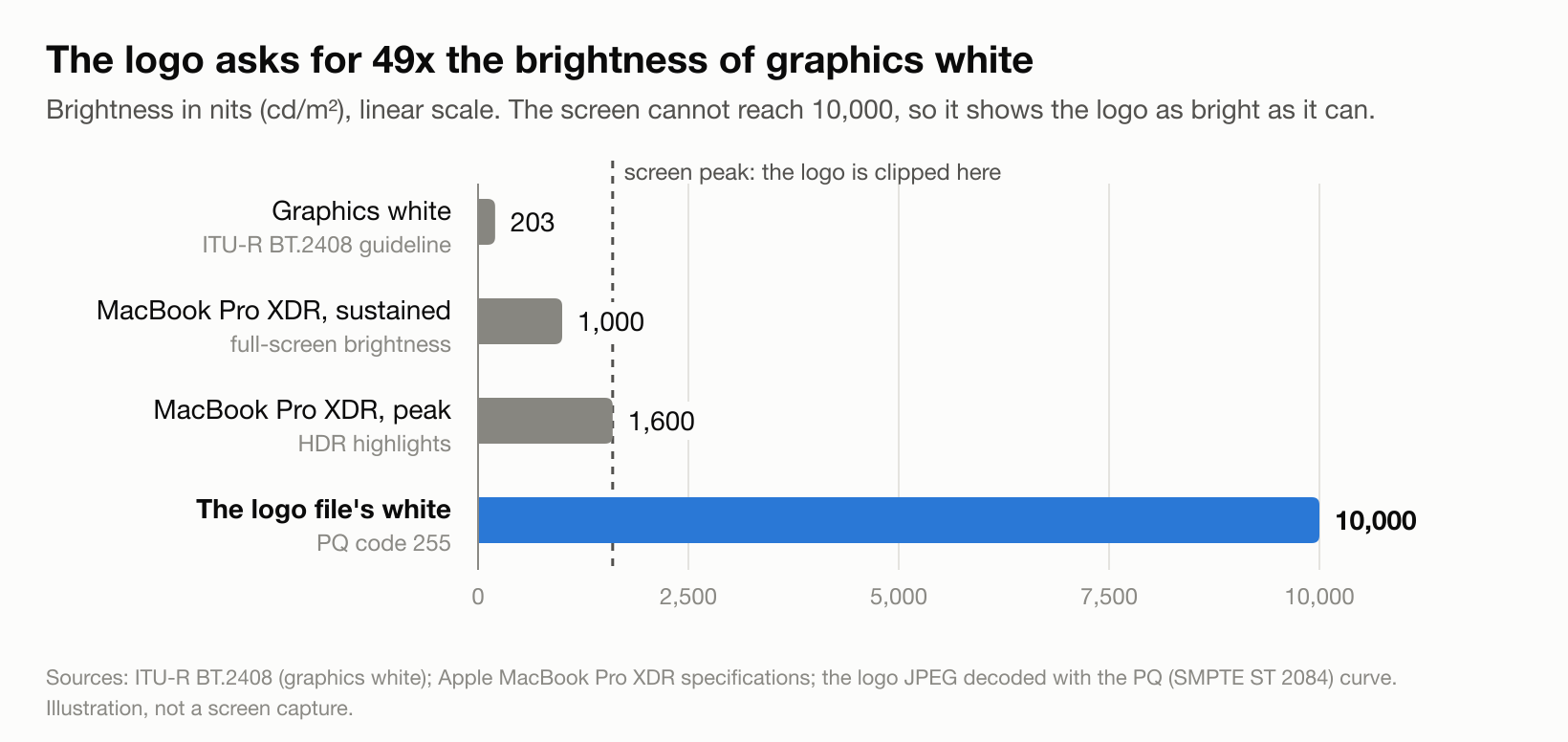
Looking inside the logo’s image file showed why. The file was saved with a special label that tells the screen “this white is as bright as possible.” In numbers, it asks for about 49 times the brightness that broadcast experts recommend for white text and graphics. The screen can’t go that far, so it simply goes as bright as it can, which is still several times brighter than the page around it.

Two phone photos of the demo on a MacBook, taken the same way, switching every 1.5 seconds: how it looks today, and how it would look if the setting existed. If you’ve asked your device to reduce motion, you see them side by side instead, which is exactly the kind of preference this proposal is about.
Nobody meant for this to happen. The logo was most likely saved from an Apple design or photo app with an HDR option switched on. As phones now take HDR photos by default, more and more pictures that people upload (profile photos, logos, product photos) carry this extra brightness onto websites whose makers never chose it.
You can’t see it in a screenshot
A screenshot of that email looks completely normal. Screenshots are saved as ordinary pictures, which cannot hold anything brighter than normal white, so the glow is cut off. That is why the problem slips past designers, testers and bug reports. You only notice it live, on an HDR screen.
The real harm is the sudden jump
The problem is not that the screen is bright. It is the sudden difference: you are reading a calm, dim page late at night, you scroll, and one picture flares up. It is like watching a quiet TV programme when an advert comes on much louder than the show.
For most people this is just unpleasant. For people with migraines, light sensitivity or certain eye conditions, it can actually hurt.
What exists today, and why it isn’t enough
To understand the gap, it helps to know who controls what:
- Website makers (developers) write the code that decides how a page looks.
- Browsers (Chrome, Safari, Edge, Firefox) are the apps you use to open websites.
- Your device’s settings (iPhone, Android, Mac, Windows) control the whole screen.
Here is what each one can do today:
| What exists | Who controls it | Why it doesn’t solve the problem |
|---|---|---|
| A brightness “cap” website makers can add to their page’s code | Website makers | Only works if they know about HDR and remember to add it. Very few do. |
| A way for websites to ask “can this screen do HDR?” | The screen itself | It tells the website what the screen can do, not what the person wants. |
| “Reduce White Point” on iPhone and iPad | You | Dims the whole screen, including the text you are trying to read. The glowing picture is still much brighter than the page around it. |
| An HDR brightness option on Android | You | Only seen in test versions of Android so far, and apps can’t see it. |
| HDR on/off on Windows | You | All or nothing for the whole screen. |
| Similar caps in iPhone and Android app-building tools | App makers | Same as websites: app makers can cap brightness, but there is no way for them to know what you prefer. |
So today a website maker can limit brightness for everyone with an HDR screen, or for no one. They cannot do it just for the people who need it, because there is no way for those people to say so.
The rulebook already asks for it
The official web rulebook for HDR (a document from the W3C, the group that writes web standards) already says browsers should let people limit the maximum brightness:
“Some individuals may have a sensitivity to very bright colors, so user agents should provide a mechanism to limit the maximum luminance at user option.”
(“User agents” means browsers. “Luminance” means brightness.)
But it is only a recommendation, it doesn’t say how, and I found no browser that offers such a setting today. Source: CSS Color HDR 1, Accessibility Considerations.
What the numbers say
Google publishes how often web pages use different features, measured across Chrome visits. Figures from 16 October 2026:
| Feature | Share of page visits that use it |
|---|---|
| Respecting the “reduce motion” setting | 58.3% |
| Respecting the “more or less contrast” setting | 27.2% |
| Asking “can this screen do HDR?” | 6.6% |
| Respecting the “reduce transparency” setting | 5.5% |
| Actually capping HDR brightness | 0.66% |
In plain terms:
- More than half of page visits respect the “reduce motion” setting. That shows people’s settings work, and websites follow them.
- Pages check whether a screen can do HDR ten times more often than they actually cap the brightness.
- The brightness cap shows up about 90 times less often than “reduce motion” support.
Who this is for
We’d like to hear from you. The web standards group asks for real-life examples before adding a new setting. If sudden bright flashes on screens affect you, or someone you care for, please share your experience. People this is likely to matter for:
- People who get migraines, for whom sudden bright light is a common trigger.
- People with light sensitivity (photophobia), including after a concussion or eye surgery.
- People with low vision who keep their screens bright to read, and so can’t simply dim the screen to avoid the flashes.
- Anyone reading in a dark room at night.
What this proposal wants
- One setting a person turns on once, that websites and apps then respect everywhere.
- Protection even on websites whose makers do nothing.
- A way for website makers who care to do better, for example showing a normal picture instead of a bright video.
- Building on tools that already exist, instead of inventing something entirely new.
What it does not try to do
- Change how HDR pictures are made or saved.
- Replace the brightness or night-mode settings your device already has.
- Set new rules about flashing content for people with epilepsy. That is a related gap, mentioned below.
The proposed solution
The proposal has two parts. They work best together.
Part 1: a safety net that works everywhere
A setting in your browser or device that caps every picture and video at normal white brightness. Website code would not be able to override it. It would protect you on every site, including the ones whose makers have never heard of HDR.
Part 2: a signal websites can read
The same setting would also send websites a simple signal: “this person prefers no extra-bright content.” Website makers who care could then go further, such as:
- showing a still image instead of an autoplaying bright video
- using a normal version of their logo
- not starting bright videos automatically
This is exactly how the existing “reduce motion” setting works. Phones and computers already had a system setting to reduce motion, and websites were still given a way to read it. The device can slow animations down, but only the website maker can redesign the page so it doesn’t need them.
What to call it: two options
The web standards group always debates names, so the proposal offers two on purpose.
Option A: brightness levels. People pick how much extra brightness they are comfortable with:
- standard: no brighter than normal white
- constrained: a little brighter than white, but no big flashes
- no preference: full HDR, as today
This matches the three brightness levels that already exist in website code and in Apple’s app tools. The middle level is real: in the demo, at about half screen brightness, “constrained” and “standard” look clearly different. The downside is that the name sounds very close to the existing “can this screen do HDR?” check, and a website maker could easily mix them up.
Option B: a simple on/off switch. Called something like “reduce peak brightness” or “reduce highlights”, with two choices: reduce or no preference.
This matches the existing “reduce motion” and “reduce transparency” settings, and it is obvious what it is for. The downside is that the words are less familiar, there is no middle level, and people may reply that “you can just dim your screen.”
A lesson from sound: loud TV adverts
Sound had the very same problem years ago: an advert or a song much louder than everything around it. It was solved step by step:
| Sound | Screen brightness | |
|---|---|---|
| How it is measured | A standard measure of how loud something feels compared with what is around it | Only raw brightness. No standard measure of how big a brightness jump feels. |
| Industry guideline | Broadcasters agreed on target loudness levels | A broadcast guideline for how bright white graphics should be exists, but almost no one outside TV follows it |
| Law | A 2010 US law (the CALM Act) says TV adverts may not be louder than the programme | None |
| Automatic evening-out | Spotify, Apple Music and YouTube adjust every song to a similar loudness | None. Browsers show each picture as bright as its file asks. |
| Your own choice | Spotify lets you pick Loud, Normal or Quiet, or switch it off | None |
What we can learn from it:
- Even things out by default, and let people choose the level. Spotify’s Loud, Normal and Quiet line up neatly with the three brightness levels above.
- What matters is the jump, not the overall level.
- Guidelines alone don’t work. The fix has to happen where the content is played or shown, which for websites means the browser.
- Turning down the master volume never fixed loud adverts. Evening out the loud part did. Dimming your whole screen is the master volume.
Likely objections, and answers
“Can’t people just dim their screen?”
Dimming helps, but it isn’t enough:
- It dims everything, including the text you are reading. The glowing picture is still several times brighter than the page around it, because the jump is about the difference, not the overall level.
- It isn’t available everywhere. iPhone and iPad have “Reduce White Point”. I found no equivalent on Macs, Android only has it in test versions, and Windows only has on/off.
- Your device can’t redesign a website. Only the website maker can swap a bright video for a still picture, and only if they know you want that.
- The “reduce motion” setting faced the same question and was added anyway.
“Can’t websites already tell if a screen does HDR?”
Yes, but that is a fact about the screen, not the person. An HDR laptop is an HDR laptop whether its owner loves the extra brightness or gets headaches from it.
“Doesn’t every new setting help websites track people?”
Every setting a website can read adds a tiny clue that could help tell people apart. Other settings like “reduce motion”, “more contrast” and “reduce transparency” were added anyway, because the benefit was worth it. One open question is whether this signal should only exist on HDR screens, in which case it would reveal nothing at all on ordinary screens.
The demo
There is a live demo page. It recreates the email inbox with the real glowing logo. A switch at the top lets you compare:
- Today (no limit): how it looks now
- Constrained: a little extra brightness allowed
- If my preference were respected: capped at normal white
It also shows the same logo three ways side by side. You need an HDR screen and the Chrome, Edge or Safari browser to see the difference. Screen recordings won’t capture it, for the same reason screenshots don’t.
Related work
- The web standards group is already discussing how a person’s brightness limit should work alongside website code, in an open discussion (#11790). It has no answer yet.
- A proposal for a “reduce strobing” setting (#8651), to protect people sensitive to flashing, has stalled.
- The web accessibility rules for flashing content, which protect people with epilepsy, measure brightness on the assumption that normal white is the maximum. They say nothing about screens that go far brighter. That is a separate gap worth raising.
Questions still open
- Option A (levels) or Option B (on/off), or a different name?
- When the safety net is on, should it allow no extra brightness, or a little?
- Should videos be included from the start, or only pictures first?
- Should the signal only exist on HDR screens?
Glossary
- HDR (high dynamic range): a screen or picture that can show highlights brighter than normal white.
- SDR (standard dynamic range): ordinary screens and pictures, where white is the brightest thing.
- Browser: the app you use to open websites (Chrome, Safari, Edge, Firefox).
- Developer / website maker: the person or team who writes a website’s or app’s code.
- Setting / preference: a choice you make once on your device, such as “reduce motion” or “dark mode”, that apps and websites can follow.
- Cap: an upper limit on brightness.
- W3C and the web standards group (CSS Working Group): the organisations that write the shared rules all browsers follow.
- Nits: the unit used to measure screen brightness. Broadcast guidelines put white graphics at about 200 nits. The logo’s file asked for 10,000.
For the technical version, with exact names and sources, see the technical version, which also lists all sources.