5 things I got wrong building account deletion for a solo SaaS
Originally published on LinkedIn
Soft deletes, 30-day purges, email blocklists, and a privacy policy I had to rewrite so it tells the truth.
I tested the new feature on production with a throwaway email address. The script replied: “Blocked.” Everything looked fine. It wasn’t blocked. Anyone using that address could still sign in.
That was the last of several mistakes I made in one week of building something that sounds trivial: letting a user delete their account. This is the story of each of them, in the order I made them, and in plain terms. You don’t need to be a developer to follow it.
Why this mattered
I’m building CertPulse. It’s a tool that lets event organisers, like swim meet or marathon organisers, issue verifiable certificates to their participants. To do that, organisers upload rosters full of real people: names, email addresses, results.
So “we’ll delete your data” is a promise I have to be able to keep, not a line in a footer.
The trigger was mundane. I had signed up to my own product with a personal email address to test it, and created a few events along the way. I wanted that test account gone from production. And there was no way to do it. No button, no tool, nothing.
I could have removed it by hand, straight from the database. But that would only have removed the records. The uploaded images and generated certificate files live in separate file storage, and nothing would have cleaned those up. They would have stayed there forever, attached to nobody.
If I couldn’t cleanly delete my own test account, I certainly couldn’t promise a customer I’d delete theirs.
A few words you’ll need
Three ideas come up again and again below:
-
Magic link. CertPulse has no passwords for new users. You type your email, it sends you a link, you click it and you’re in. Keep this in mind: it matters in chapter 1.
-
Archive, then purge. Deleting doesn’t erase straight away. It hides everything first (archive), and erases it for good later (purge). Think of a recycle bin that empties itself after 30 days.
-
Fingerprint. A scrambled code made from a piece of text, like an email address. The same email always gives the same code, but you can’t turn the code back into the email. Chapters 2 and 3 depend on this.
What I built
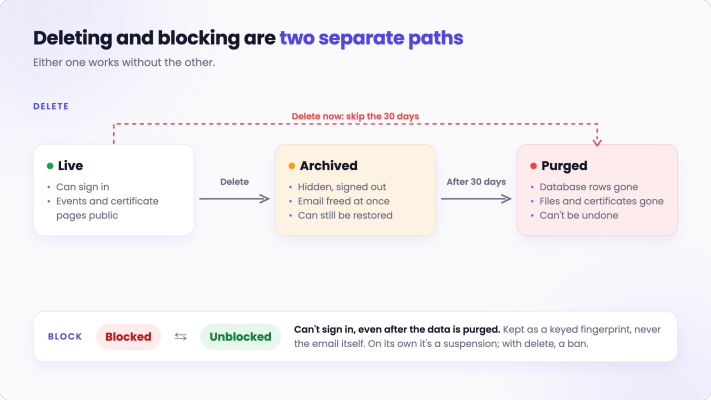
Deleting an account hides it straight away: the user is signed out, their events disappear, their public certificate pages stop working. Thirty days later, a purge removes everything for good: database records, uploaded images, generated certificate files. When someone wants it gone today, there’s an option for that too.
A few choices I’m happy with:
-
Every run shows exactly what it will delete, and nothing happens without an explicit confirm. Deleting is the one thing you can’t undo, so looking first is the default.
-
Files are found by listing what’s actually in storage, not only by following database references. So an image someone uploaded but never saved to an event still gets cleaned up.
-
The database is cleaned first, then the files. If file deletion fails halfway, I get a list of leftover files to remove by hand. The other order would be worse: live records pointing at files that no longer exist.
Getting there, I got five things wrong. The first two turned out to be one story.
Chapter 1: What does “delete” actually mean?
Mistakes 1 and 2: I thought delete was one feature, and my first version silently locked people out for a month.
My first instinct was one command: delete the user. Then I asked a simple question. Who is being deleted, and why?
Picture two people.
The first is an organiser who ran one event, is done with CertPulse, and asks me to remove their data. Maybe they come back next year. If they do, they should be able to sign up again like anyone else.
The second is someone abusing the product. I want their data gone too, but more importantly, I want them to stay out. If they sign up again with the same email, that should fail.
Same button, opposite needs from the email address. One wants it free; the other wants it locked.
So “delete” became two separate actions, the same split most mature products make:
-
Delete: the data goes. The email is free to sign up again.
-
Block: the person stays out. Their data can stay (a suspension) or go (a ban).
Either works without the other. Treating them as one would have forced a bad choice every single time.
I also said no to two tempting ideas:
-
“Sign in during the 30 days to cancel the deletion.” Many apps do this. But for the abuse case, it means the person gets everything back just by logging in. Wrong for me.
-
“Tell them the account was deleted, contact support.” Honest, but it still stops a real person from signing up again for a month, for no benefit.
There was one more detail that’s easy to miss. An event can have several organisers. Deleting one account only removes the events that person runs alone. For shared events, their access is taken away immediately, not in 30 days, so nobody keeps working on an event through an old session.
That design felt finished. It wasn’t.
The moment it broke
In my first version, an archived account kept its email address during the 30 days. The account was hidden, not gone, so keeping the email seemed harmless.
Then, instead of looking at database records, I walked through the screens a real user would see.
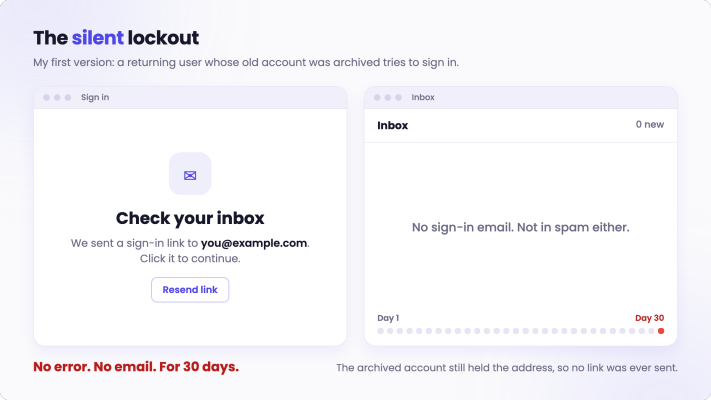
Remember the magic link. Someone whose account was archived comes back and types their email. The page says “Check your inbox.” Behind the scenes, the system finds an account with that email, sees that it’s archived, and quietly sends nothing.
So they wait. They check spam. They try again. “Check your inbox.” Nothing, for a whole month. No error, no explanation. As far as they can tell, the product is just broken.
That’s worse than an error message. An error at least tells you something.
The fix
When an account is archived, its email address is moved aside and replaced with a placeholder that can never receive mail. The real address is immediately free. If that person signs in, they get a fresh, empty account, exactly like a new user. Their old data is untouched and still gets purged on schedule.
The lesson: walk through the screens the deleted or blocked person will see, not just the database records. That’s where my worst bug was hiding.
Chapter 2: An email address is not a piece of text
Mistake 3: I treated email addresses as plain text.
Blocking forced me to look closely at a question I’d never really asked: when are two email addresses the same?
Capital letters. Email providers ignore capitals. You@Gmail.com and you@gmail.com reach the same inbox. While building the blocklist, I found that my sign-in didn’t ignore them. Nothing was lowercasing the address. The same person, typing their email two different ways, could have ended up with two separate accounts. Nobody had hit it yet. Fixed before anybody did.
The twist. The obvious fix was “lowercase every email, everywhere.” That would have broken something else.
When an organiser re-uploads a participant list (say, with corrected results), CertPulse matches each row to the participant already there by their email, exactly as it was first stored. If I had started lowercasing those emails, “Jane.Doe@…” from the first upload wouldn’t match “jane.doe@…” from the second, and the organiser would suddenly have duplicate participants.
So account emails got their own rule (lowercase), and participant lists kept theirs. Same kind of data, different rules, because it’s used for different jobs.
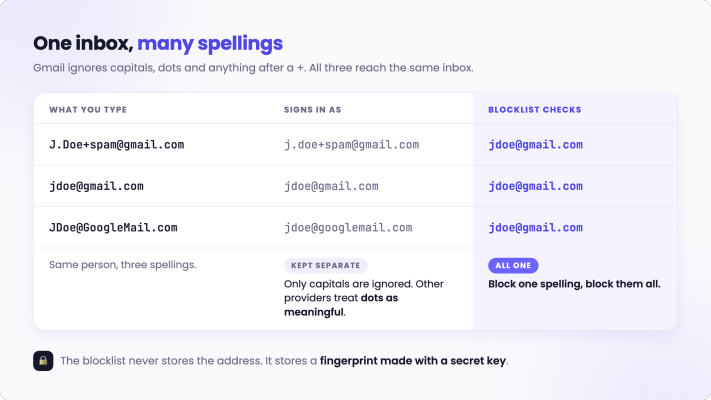
Gmail’s many spellings. Gmail goes further. It ignores dots, and anything after a plus sign. So J.Doe+spam@gmail.com, jdoe@gmail.com and JDoe@googlemail.com all land in the same inbox.
For blocking, that matters. If I block jdoe@gmail.com, the same person must not walk back in as j.doe+new@gmail.com. So the blocklist folds all of those spellings into one.
But I only do that folding for blocking, never for deciding which account you log into. Other email providers treat dots as meaningful: john.smith and johnsmith can be two different real people. Merging accounts on that basis could hand one person’s data to another.
What the blocklist stores. The blocklist has an awkward job. It has to keep working after everything else about the person is deleted. That’s the whole point: delete their data, keep them out.
But keeping a list of the email addresses of everyone I’ve ever blocked would mean keeping personal data forever, in the one place designed to outlive deletion. So the list doesn’t store the email. It stores a fingerprint, plus a masked hint like “j***@gmail.com” so I can still read the list.
When someone tries to sign in, the server makes a fingerprint of what they typed and checks whether it’s on the list. Same email, same fingerprint, so a match is found.
Why a plain fingerprint isn’t enough. My first draft used an ordinary fingerprint. The problem: anyone who got hold of the list could take a big list of common email addresses, fingerprint each one, and look for matches. Not reversing the code, just guessing and checking.
So the fingerprint is made with a secret key, known only to my server. Without the key, you can’t make matching fingerprints, and the list is useless to anyone who steals it.
That secret key is where mistake 4 comes in.
The lesson: decide what “the same email” means for each job separately. The rule for who you are and the rule for who is blocked don’t have to be the same, and shouldn’t be.
Chapter 3: “Blocked.” It wasn’t.
Mistake 4: I assumed my admin script knew the key.
Background. CertPulse has no admin screens for this yet. I block someone by running a small script on my laptop, pointed at the live system.
The script and the server both need the same secret key, because the script writes the fingerprint and the server checks it. Think of two people who must use the same padlock combination. If the script locks the door with one combination and the server tries another, the door never opens, and nobody notices.
My laptop has its own key for development, different from the real one. So I already made the script refuse to use it against production: it insists I give it the production key explicitly.
That felt safe. Then I tested it the way I should test anything that involves a secret: I gave it the wrong key on purpose.
The moment it broke. The script replied: “Blocked.”
It had no way to know the key was wrong. Any key produces a perfectly valid-looking fingerprint. So it saved one the server would never match. The address was on the list, and sign-in still worked.
Silent failure is the worst kind, because you only find out when it matters. In real life, that would have been the day I tried to keep an abusive user out, told myself it was done, and it wasn’t.
The fix. When the server starts, it leaves a sample: the fingerprint of a fixed phrase, made with its own key. The sample reveals nothing about the key itself.
Before blocking anyone, the script makes the same sample from the key it was given and compares. Same key, same sample, carry on. Wrong key, and it stops: “this isn’t the key the server uses. Nothing was written.”
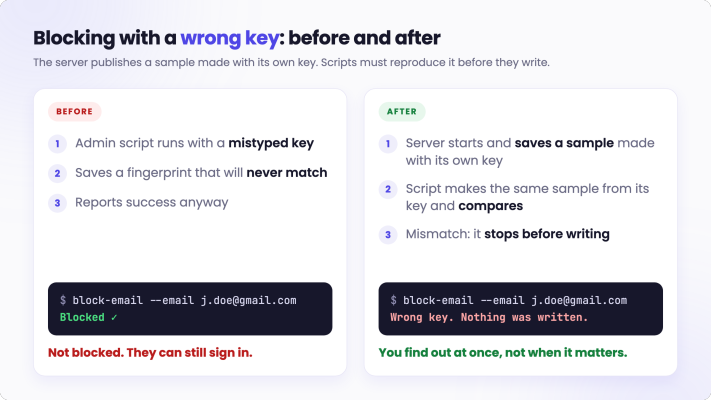
Two more safety choices came out of this:
-
The key can never change. If it did, every existing block would silently stop matching. So if the server ever starts with a different key than the one that left the sample, it warns loudly that existing blocks are no longer being enforced. That warning is the only signal a changed key would otherwise give.
-
A missing key fails in the safe direction. If the key isn’t set at all, blocking refuses to run, but sign-in keeps working. A configuration slip can’t lock every organiser out of the app.
And one more thing I got right because of chapter 1: a blocked person trying to sign in doesn’t see the silent “Check your inbox”. They see a clear message that the email can’t be used, and who to contact.
The lesson: test the failure paths on purpose, especially anything involving secrets. Testing only the happy path would have shipped a blocklist that looked like it worked.
Chapter 4: Reading my privacy policy against my code
Mistake 5: my privacy policy promised things my code didn’t do.
Background. Most small products start with a privacy policy that’s partly a template. You write it early, when the product is mostly plans, and then nobody reads it again.
With deletion built, I finally had real behaviour to compare it against. So I reread the policy line by line, and asked of each sentence: does the code actually do this?
It didn’t hold up:
-
It promised participant data would be “archived after 2 years.” No code did that. Nothing had ever archived anything after 2 years.
-
It said I’d remove an account on request, with no timeline and no mention of the 30-day window.
-
It said nothing about blocked addresses, or about backups.
None of these were lies when written. They were intentions. But a privacy policy isn’t a roadmap. A customer reads it as a description of what happens to their data today.
The fix. I rewrote the policy to describe what actually happens. And I changed “30 days” to “60 days”.
Why? The purge isn’t automated yet. I run it by hand, once a month, and it only removes things that have waited at least 30 days. Say something is deleted the day after a purge. At the next purge, a month later, it has waited 29 days: not yet. It goes at the one after that, close to 60 days after it was deleted. Promising 30 would have been a promise I could break without doing anything wrong.
I also listed the gaps honestly instead of papering over them. One example: if an individual participant (not an organiser) asks to be erased, that’s still a manual job for now, with a written deadline.
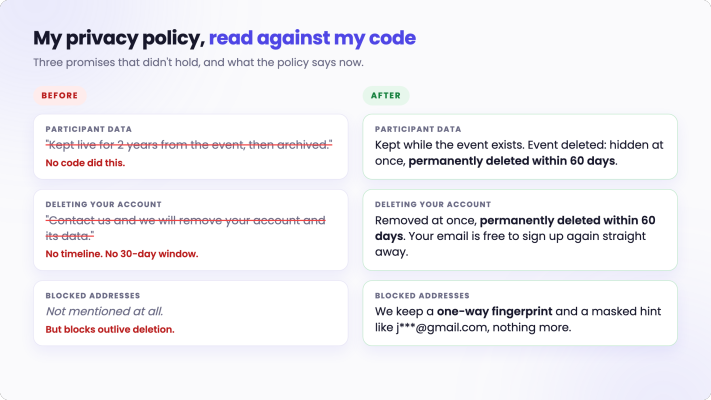
The lesson: a promise has to match what you can keep today, not what you plan to automate one day.
What I’d tell another solo founder
-
Decide what “delete” and “block” each mean before writing any code.
-
Walk through the screens the deleted or blocked person will see. That’s where my worst bug was hiding.
-
Decide what “the same email” means for each job, separately.
-
Make destructive tools show a dry run by default.
-
Test failure paths on purpose, especially anything involving secrets.
-
Read your privacy policy against your code, line by line. Backups count too.
None of this is visible in the product. There’s no “delete account” button yet; it’s all admin tools and a policy page. But it’s the kind of work that decides whether you can look a customer in the eye when they ask, “what happens to my participants’ data?”
If you’ve built account deletion or data retention yourself, I’d love to hear what caught you out.